A portfolio profile that gets clients
Your profile is prewalk.co/@yourname: a portfolio page that holds your public tours and projects, and the page people land on from Explore, from a credit or from the Share button on any of your tours. It takes about ten minutes to complete. Everything here is in Settings → Profile.
1. Avatar
A square image, at least 400 px. For a person, a clear photo of your face; for a company profile, the logo on a plain background. The avatar appears next to your name everywhere: cards, comments, credits, the hover card in Explore.
2. Cover
Two choices:
- An image, 3:1, at least 1500 × 500 px. A wide exterior or a hero render.
- A 360° cover: a scene from one of your public tours. It turns slowly at the top of your profile. Share previews and embeds show a still frame. Pick a scene with the best light and no hotspot in the middle.
The 360° cover is what makes a Prewalk profile look like a Prewalk profile. Use it once you have a tour you are proud of.
3. Name and bio
The bio takes up to 300 characters. The template: who you are + where you work + what you do, in that order.
"Independent real estate agent in Izmir, Karşıyaka and Bostanlı. 360° tours of every listing, so you can walk the home before the showing."
"Architectural visualization studio in Berlin. 360° renders and VR walkthroughs for developers and architects. Credited on the projects below."
"Boutique hotel in Alaçatı. Walk every room type before you book."
One sentence about you, one about what the visitor can do here. No list of adjectives.
4. Location, website and social links
Location is "City, country". Website is the link visitors click to reach you on the Free plan, so point it at the page where they can contact you. Add up to five social links. Visitor links open in a new tab and carry a nofollow attribute, which is normal for user profiles.
5. Pin your best work
Under Pinned, choose up to three public tours or projects. They stay at the top of your Tours tab regardless of date. Pin the work that shows your range: one home, one exterior, one project page with a floor plan.
6. Explore
List my profile in Explore is on by default. Leave it on if you want new clients to find you; turn it off to use the profile only as a portfolio behind your own links.
The Featured tab on Explore is picked by hand by the Prewalk team. What gets picked: public work with a complete profile, a clear title, a good cover and return hotspots in every room. New is chronological, so publishing regularly keeps you visible there.
7. Get in touch (Pro and above)
On Pro and above, Show "Get in touch" adds a contact form to your profile, your projects, your embeds and the inside of every tour. Messages arrive by email. Add a WhatsApp number for a WhatsApp button and a phone number for a call button. You can link your own privacy notice; if you leave it empty, Prewalk's template notice is shown.
On the Free plan, visitors reach you through the website link.
8. Who can credit me
Agents and studios credit each other on projects. This setting decides who may tag you: everyone (default), only people you follow, or nobody. Accepted credits appear on your Credits tab, which is how a render studio's profile fills up with client work. See Credits: tag the studio, accept a credit.
What visitors see
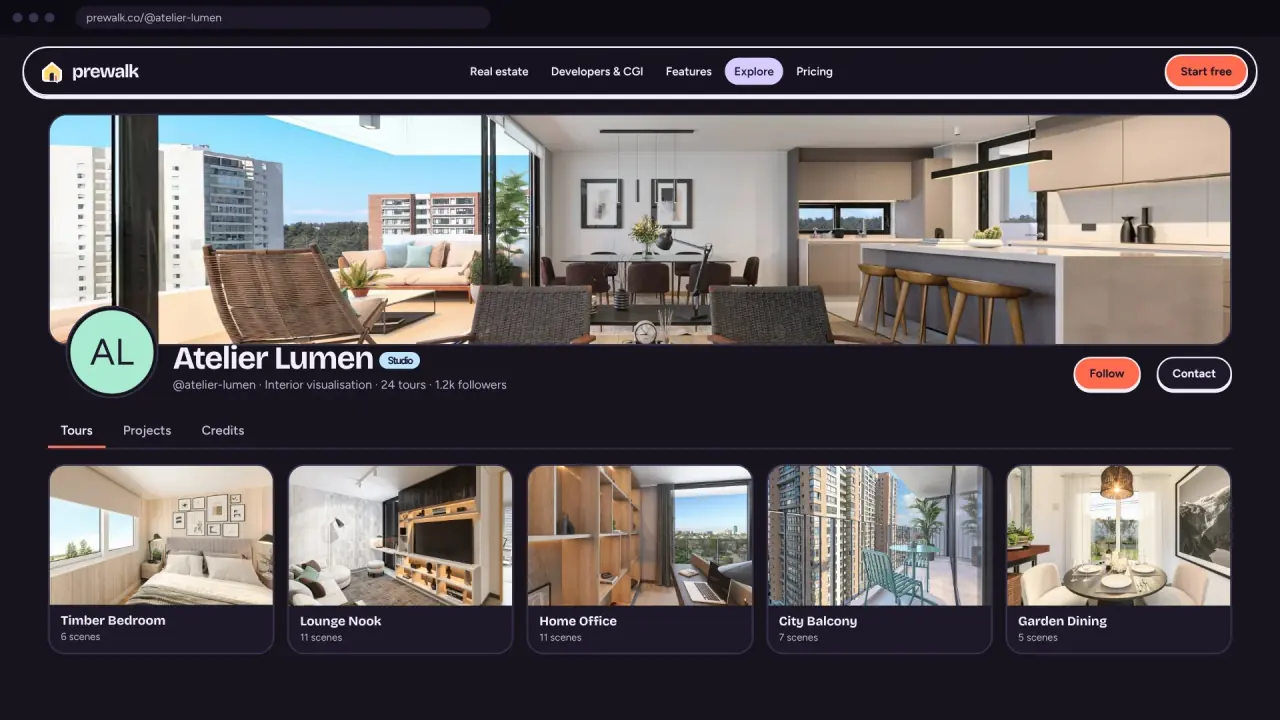
Your public profile shows the cover, avatar, name and @username, bio, location, links, and counters for tours, projects, followers, following and total views. Three tabs: Tours, Projects, Credits. Only public work appears. A Share button gives visitors the link, a QR code and the portfolio embed.
Badges appear under your name: Beta member for accounts created during the beta, then milestones such as First tour, 10 tours, 1,000 views and First embed. They are permanent. Only the highest of a family shows: once you have "10 tours", "First tour" is hidden.
Your username
Three to thirty characters, letters, numbers, dots and underscores, starting with a letter. You can change it once every 30 days. The old address redirects to the new one for 30 days, then it is released. Use your name or your brand; a company can be added later as a separate company account.
Common mistakes
- A logo as the avatar on a personal profile, and a face on the company profile. Swap them.
- An empty bio. The hover card in Explore shows the first line of it; empty means a card with just a name.
- Website pointing at a home page with no contact details.
- Pinning three tours of the same flat.
Next
Share a tour: WhatsApp, listing portals, email signature and QR