For real estate agents
 For real estate agents
Show the whole home, not just the best photo.
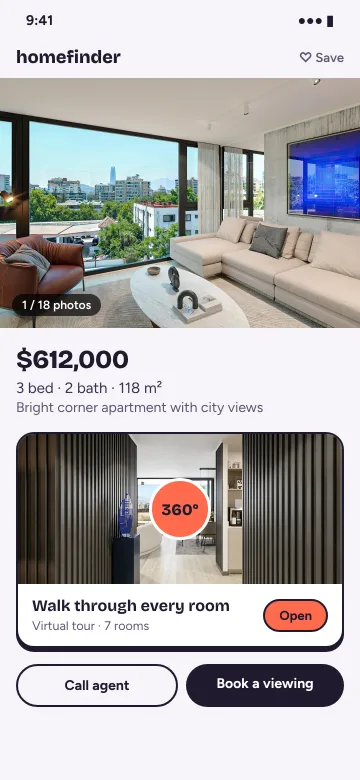
A 360° tour lets buyers move through a home room by room on their phone, from a single link. Here’s how it works for agents.
Want buyers who’ve already walked every room?
Buyers can walk the home from your listing whenever they like, and come to a showing already knowing the layout, the light and the finishes.
Want your listing to look different from the ten next to it?
Most listings are a scroll of photos. A tour lets buyers step inside and look around for themselves.
Meeting a seller?
Open one of your tours on your phone and show them how you’ll present their home.
Where to use it
One tour, every place you market a home
On the listing
Paste the tour link wherever a portal allows a link, or embed the tour on your own website.
In messages
Send the link on WhatsApp or by email. On WhatsApp it shows a preview image, and it opens in the buyer’s browser.
In the listing presentation
Show sellers a tour on your tablet or phone before they sign — it shows how you work.
After a showing
Send the tour so buyers can walk the home again, or show it to family who couldn’t come.


On Pro and above
Let buyers get in touch
Get in touch
A “Get in touch” button inside your tours and on your portfolio, projects and embeds. In a tour it opens a panel over the tour; messages arrive in your email. Add your business number for WhatsApp and phone buttons.
Daily view trends
See how often each tour is opened, day by day, over the last 90 days.
Branded embed
Embed your tours on your own website with your logo and accent color, and no Prewalk badge.
Your logo
Your logo on every tour, and no Prewalk badge.

On every plan
Private until you say so
Link-only by default
New tours are link-only by default — they don’t show on your profile, in Explore or in search. You decide when a tour goes public.
No location in your photos
Location (GPS) and camera details are removed from the photos you upload.
Previews on WhatsApp
Link-only tours preview on WhatsApp too, with a cover image and title.
QR codes
Download a QR code (PNG or SVG) for signs and business cards — with your logo in the middle on Pro and above.

How it works
Shoot, connect, share.
Shoot the home in 360°
Take a 360° photo in each room and where rooms connect — a full 2:1 panorama saved as JPG, PNG, TIFF or WebP. Renders work too.
Connect the rooms
Upload every photo at once — scenes open as they’re ready, and full resolution follows. Drag a scene from the scene strip at the bottom onto the 360° view; the transition point lands exactly where you drop it. Set where each room opens.
Share one link
The tour opens in the browser on a phone, tablet or laptop — or embed it on your website.


Shooting tips
How to shoot a home for a tour
You don’t need a studio. A 360° camera, a stand and a tidy home get you most of the way.
One photo per room, plus hallways
Set the camera near the middle of each room. Add a photo in hallways and at doorways so rooms connect naturally.
About 5 ft up, on a stand
Put the camera on a monopod or light stand about 5 ft (1.5 m) off the floor, and make sure it’s level.
Lights on, doors open
Turn on every light, open interior doors and blinds, and move clutter out of sight.
Step out of the shot
Use your camera app’s timer or remote shutter and leave the room, or hide behind a door.
Shoot in daylight
Mid-morning to mid-afternoon usually gives even light without harsh sun through the windows.
Export the full 360°
Save each photo as a full 2:1 equirectangular JPG — not a cropped or “flat” version.
Pricing for agents
Pro for you, Office for the team
Pro is built for an individual agent: up to 500 scenes, your logo, Get in touch and daily view trends. Running an office? Office adds 5 users, 5 brand portfolios, detailed analytics and your own domain for tour links and embeds.
- For agents & CGI artists
Pro
$15/mo, billed yearly
$19 month-to-month
Start with Pro- Up to 500 scenes
- 16K 360° images and stereo VR
- Tour sound: background music and 3D sound
- Your logo — no Prewalk badge
- Get in touch, with optional WhatsApp and phone buttons
- Password-protected tours
- Daily view trends
- Branded embed — your logo and color, no Prewalk badge
- For offices & studios
Office
$39/mo, billed yearly
$49 month-to-month
Start with Office- Up to 3,000 scenes
- 5 users posting as up to 5 brands — each brand gets its own portfolio
- Detailed analytics
- Your own domain for tour links and embeds
- Priority support
FAQ
Questions agents ask
Which 360° cameras work?
If your camera’s app can export a full 360° photo — the standard 2:1 “equirectangular” image — as a JPG, it works. PNG, TIFF and WebP too, up to 16K (8K on the Free plan). Not sure? Upload one photo on the Free plan and see.
Can I put the tour on a property portal?
You can paste the tour link wherever a portal accepts a link, and embed the tour on your own website on every plan.
Do buyers need an app?
No. The tour opens in the browser on a phone, tablet or computer.
How does “Get in touch” work?
On Pro and above, a “Get in touch” button inside your tours and on your portfolio, projects and embeds sends buyers’ messages to your email. Add your business number and WhatsApp and phone buttons appear too.
Your next home, ready to walk through.
Start free, or request a demo — we’ll reply by email to set up a 30-minute live demo.