What is a stereo 360° render?
A standard 360° render captures one view of a scene from a single point — the same image is shown to both eyes. A stereo 360° render instead captures two slightly offset views, one for the left eye and one for the right, the way human eyes each see a scene from a slightly different position. That's what allows a scene to be perceived with real depth rather than as a flat image, typically when viewed through a VR headset.
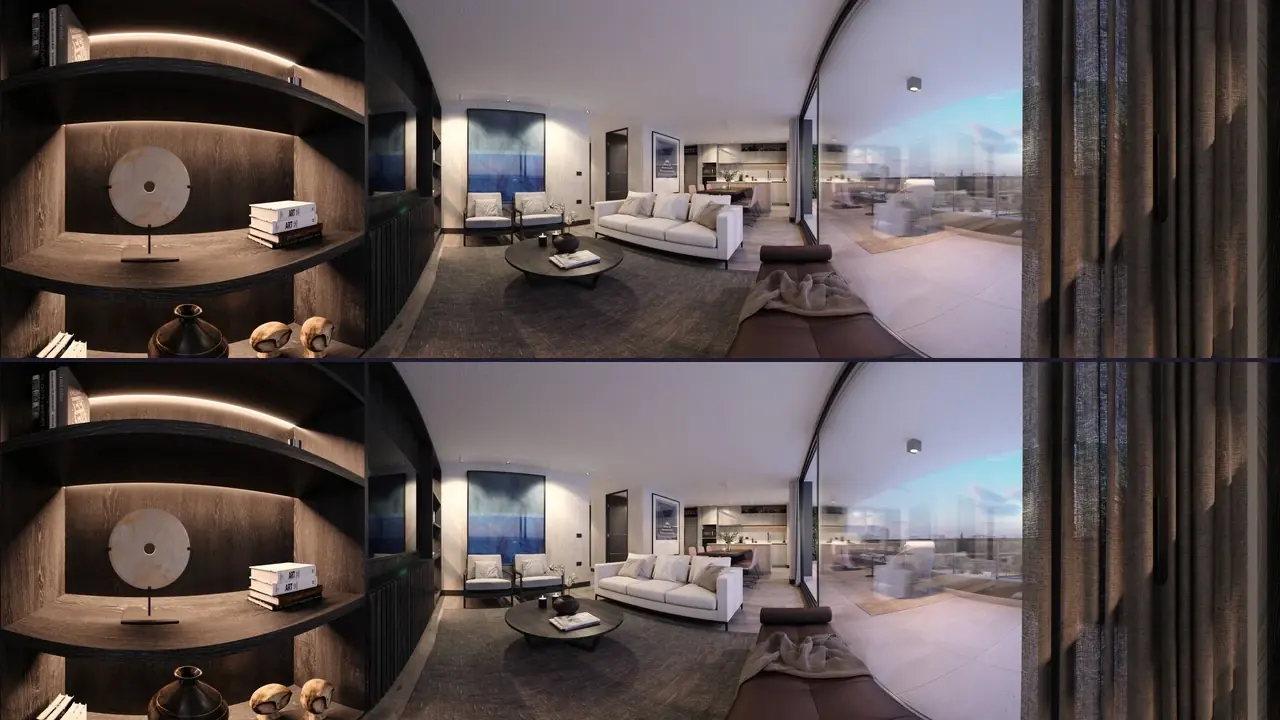
A common way to package a stereo 360° render is 'top-bottom' — the left-eye panorama stacked directly above the right-eye panorama in a single square (1:1) image file, rather than two separate files. This keeps the pair together and easy to handle as one asset.
Prewalk supports top-bottom stereo 360° renders alongside standard panoramas; stereo upload is on Pro and above. On a phone or computer, a stereo tour works like any other 360° tour — walkable and zoomable. Open it in the browser on a Meta Quest and you see real 3D depth. Regular mono images appear flat in VR.